

User motivation goes beyond esthetic appeal. It’s about crafting digital experiences that users find natural, clear, and pleasant.
The usability of many company intranets is so poor that employees struggle with simple tasks independently. This happens because teams miss what truly drives their users. A product fails to deliver meaningful experiences when it doesn’t meet user needs – regardless of its design quality.
The human-centered approach defines user motivation in UX. Teams must grasp people’s needs, behaviors, and emotions. Explaining these concepts to non-design teams often feels like speaking a foreign language.
UX workshops prove vital for this reason. Organizations that excel at design create products that strike a chord with users and boost customer satisfaction. The challenge lies in running these workshops when half the participants don’t understand design terminology.
You’ll find practical strategies here to run predictable and effective UX workshops with your non-design colleagues. The coverage spans from goal-setting to post-workshop follow-ups – while keeping everyone involved and lined up.
Your next UX workshop can become a soaring win!
Set the Foundation for a Successful UX Workshop
The success of your UX workshop starts well before anyone walks into the room. A solid foundation ensures your workshop delivers meaningful results instead of becoming another meeting. Here’s how you can set up workshops that deliver valuable outcomes, especially when you work with non-design colleagues.
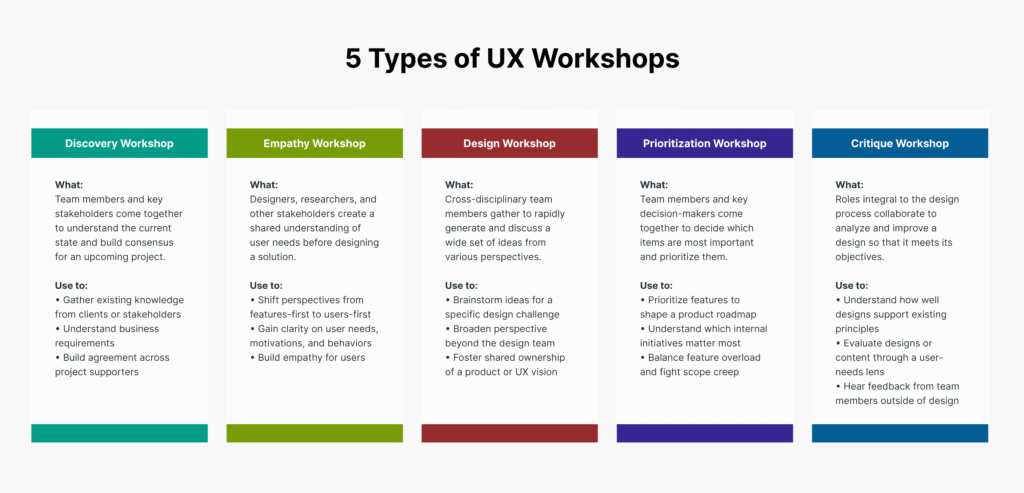
Define clear goals and outcomes
Specific objectives are the life-blood of workshops that work. Your session might lose focus and become unproductive without clear goals.
→ Start by asking: “What specific problem are we trying to solve?”
→ Document exactly what you want to achieve by the end of the workshop
→ Think over how results will help understand user motivation
Clear research objectives guide everything from participant recruiting to task design and analysis. Your studies will answer the right questions and deliver value. A purposeful selection of attendees prevents workshops from growing beyond their scope.
Regular meetings focus on updates or general awareness. Workshops shine when they need input and consensus from different groups. They benefit from shared ownership in a cooperative format.
Choose the right participants from non-design teams
Your workshop’s success largely depends on the people in the room. One expert puts it well: “a workshop is only as valuable as the people that attend them”.
A manageable group has 6-12 participants – enough people to spark engagement without chaos. Your participant selection should balance three key areas:
- Departmental diversity: Something’s wrong if your UX workshop only has design team members. Workshops give you a chance to bring together departments that rarely cooperate.
- Domain-knowledge diversity: Find the specialized knowledge areas your project needs and bring in experts to fill those gaps.
- Seniority diversity: Don’t default to only senior roles or junior team members. A mix provides complementary points of view.
Sales, Support, and Customer Success teams make great stand-ins for customer feedback. They talk to users daily. These teams can help you find research candidates and build strong connections for future workshops.
Select a suitable format and tools
Pick your tools after you decide if your workshop will be synchronous (everyone joins at once) or asynchronous (people contribute on their own time).
Synchronous workshops get things done quickly. Asynchronous formats suit teams with packed schedules or when you don’t need immediate results.
Remote workshops need carefully chosen tools to keep people engaged and valued. Your tools should match participants’ tech comfort levels – this matters more with non-designers.
Moqups helps non-designers who might not feel comfortable sketching concepts for designers. Visily offers simple wireframing and mockup design solutions that strengthen non-designers to share their ideas visually.
Note that non-designers need tools they can learn fast – something that helps them create professional-looking concepts while focusing on ideas rather than perfect details.
Design the Workshop Structure for Predictability
The foundation you set paves the way to build a predictable structure. Workshops can fall apart without clear structure. A well-laid-out approach will give participants a reason to stay involved while delivering consistent results.
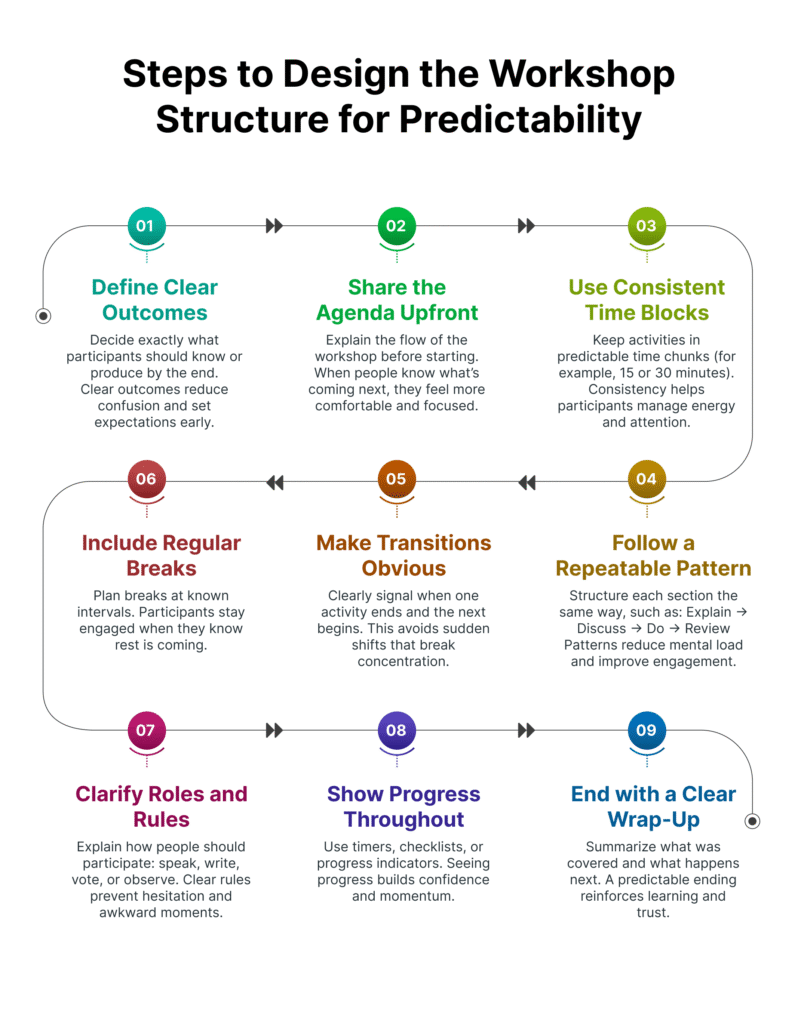
Create a detailed agenda with time blocks
Workshops without time blocks often end with rushed conclusions or unfinished activities. Time management plays a vital role in productive UX workshops that focus on user motivation.
→ Split your workshop into distinct time blocks with specific durations for each activity
→ Plan activities by working backwards from your goals
→ Add buffer time between activities to handle unexpected discussions
Time blocks help you avoid the trap of overworking by assigning specific timeframes to each task. Color-coded calendars for different workshop segments make it easy for participants to track progress through the day.
A solid agenda helps teams flow naturally, reduces confusion, and keeps everyone arranged throughout the session. Your agenda should include these stages: welcome and context, objective review, warm-up exercise, main workshop activities, group reflection, decision-making, and next steps assignment.
Use templates and repeatable frameworks
Building each workshop from scratch wastes prep time. Templates add structure and keep multiple sessions consistent.
→ Use workshop brief templates to arrange your agenda with specific goals
→ Think about proven frameworks like Google Design Sprints or Jobs to be Done
→ Pick templates that match your workshop type (journey mapping, card sorting, etc.)
The Nielsen Norman Group offers practical tools to plan and run effective workshops. Their workshop facilitation posters, cheat sheets, and planning templates help structure sessions. These resources let participants contribute without starting from scratch.
Templates help non-designers feel less anxious about joining in. Clear guidelines let everyone contribute without needing design expertise. Switching activity roles every 10-15 minutes keeps everyone involved and prevents dominant voices.
Assign roles and responsibilities in advance
Workshops become confusing and inefficient without clear responsibilities. Teams work better when everyone knows their role beforehand.
→ Build a RACI matrix (Responsible, Accountable, Consulted, Informed) for workshop tasks
→ Set specific roles for design and non-design team members
→ Make one person accountable for each task to avoid confusion
A RACI matrix shows how people with different skills will work on various tasks. This approach defines involvement through four levels: Responsible (completes the task), Accountable (provides final review), Consulted (provides input), and Informed (kept aware of progress).
Your RACI matrix should include product designers, UX researchers, content writers, and information architects from the design side. Non-design teams should include product managers, engineers, scrum masters, and business analysts. This mix ensures all views get proper representation.
Note that teams should fill out the RACI together, either through a virtual workshop or in-person meeting. This group process helps everyone understand how they contribute to learning about user motivation and creating successful outcomes.
Facilitate Engagement Across Non-Design Roles

“Experts are rarely insulted by something that is clear enough for beginners. Everybody appreciates clarity.” — Steve Krug, Author of ‘Don’t Make Me Think’, usability testing authority
Running a workshop is straightforward, but getting everyone to participate fully creates a different challenge. Non-designers joining your UX workshop need significant engagement to achieve meaningful outcomes.
Use simple language and avoid design jargon
Design terminology can create instant barriers for non-design participants. Mixed groups quickly lose interest when they face unfamiliar jargon during workshops.
→ Replace “empathy maps” with “understanding user feelings”
→ Say “customer journey” instead of “user flow paradigm”
→ Use “user needs” rather than “pain points and friction”
Designers get comfortable with specialized terminology naturally, but this can leave others feeling left out. The workshop moderator needs to be strong to make everyone feel comfortable sharing their opinions. This approach helps create shared ownership in project success as others join co-creation activities.
Incorporate real-life examples from their domain
Examples from participants’ actual work help make abstract design concepts clear and relevant.
→ Ask engineers to share technical constraints they’ve encountered
→ Invite sales team members to describe customer objections they hear
→ Request product managers to explain business goals in their words
These examples serve as reference points throughout the workshop and make activities more meaningful. Domain experts can ask qualifying questions about their field that designers might miss. Teams working together can avoid misalignment later, as no one benefits from working alone.
Encourage active participation through group tasks
People rarely learn through passive observation. Group activities promote active involvement more effectively.
→ Limit brainstorming sessions to 10-15 minutes per exercise
→ Use creative tools like markers and blank paper for sketching
→ Implement round-table discussions where each participant shares 1-2 ideas
These methods create a relaxed environment that promotes brainstorming from a user’s view. Adding reflection time after each activity helps participants think about applying these methods in their daily work. A simple question like “How would you use this in your everyday workflow?” helps non-designers see practical uses.
Yes, it is true that domain research forms the foundation of UX design work. Teams benefit from deeper user insights when members from different departments share their domain knowledge. Note that you don’t have to be a designer to promote design thinking – the practice values collaboration more than the final outcome.

“Interdisciplinary collaboration produces more interesting and innovative ideas.” — Julia Kafanskaya, UX strategist and collaboration expert
Teams work better when they share the same understanding. Workshops help bring people together. The right methods can help teams line up their points of view and leave with a unified vision.
Use visual aids like journey maps or personas
Non-designers understand complex ideas better through visual tools. Journey maps show how users interact with a product from their first contact until they reach their goals.
→ Journey maps show what users feel, what drives them and what challenges they face
→ Research-backed personas represent real users in a memorable way
→ Visual aids make abstract concepts easier to grasp and reference
People naturally connect with specific examples rather than broad generalizations, which makes personas effective. Teams can discuss user needs more precisely when they share the same mental model through personas.
Document decisions and insights immediately
Teams should capture workshop outputs as they happen to preserve valuable insights.
→ Teams can use whiteboards or digital tools to show decisions to everyone
→ Teams need to record pain points and future state designs
→ Different design versions and their reasoning should be saved for future reference
Documentation becomes the source of truth that keeps everyone aligned with product strategy and design choices. Teams make better decisions and avoid misunderstandings when they can refer to this shared record later.
Clarify next steps and ownership
Workshops need clear follow-up steps to create lasting change.
→ Teams should end sessions by assigning specific tasks to owners
→ A RACI matrix helps define who does what
→ Regular check-ins help track progress on workshop outcomes
The best workshops turn discussions into practical steps that guide teams in the same direction. Teams maintain momentum when findings reach all stakeholders after the workshop ends.
Follow Up to Ensure Long-Term Impact
Your work doesn’t end when people walk out of the workshop room. The real-life effect of your UX workshop depends on what you do next. Without good follow-up, teams might forget even the best talks about user motivation.
Send a summary with key takeaways
A good record of workshop outcomes will help your hard work stick. These steps right after the session will help:
→ Turn your workshop notes into something easy to share
→ Add photos of the process or screenshots
→ List the main things you found that there was about user motivation
Some high-stakes projects need a formal presentation, but a quick email recap is often enough.
Assign action items and deadlines
Good workshops lead to action and ownership, not just talk.
→ Make a clear list of next steps from the workshop
→ Give each task a specific owner so everyone knows their role
→ Add firm due dates for every action item
This approach builds accountability and shows real progress in learning about user motivation. The workshop roadmap should live in a shared space where everyone can find it.
Schedule a check-in to review progress
A proper follow-through wraps up the workshop cycle.
→ Book a 30-minute catch-up about a month after the workshop
→ Keep these reviews short and sweet (15-40 minutes works best)
→ See how your research findings changed designs and numbers
Tools like “Start, Stop, Continue” or “What? So What? Now What?” can help you assess how well the workshop worked and keep things moving forward.
Conclusion
Running successful UX workshops with non-design teams is straightforward. This piece explores practical strategies that make these collaborative sessions both predictable and work well.
➡️ A solid foundation gets everything off right. Clear goals, the right participants, and appropriate tools create the perfect environment for the work to be done.
➡️ Your workshop needs detailed time blocks to prevent chaos. This keeps everyone focused on solving user motivation challenges.
➡️ Plain speaking without design jargon builds bridges between departments instead of walls.
These workshops work best when everyone feels valued and understands their role. Great user experiences come from different viewpoints working together toward a common goal.
The workshop’s impact continues long after everyone leaves the room. Clear documentation, specific action items, and scheduled check-ins will give a path to turn insights into better products.
UX workshops break down barriers between design and non-design teams. They create shared understanding about user motivations while giving everyone ownership in the solution. This shared approach reshapes the scene into digital experiences that feel natural and pleasant – exactly what users want.
Next time you plan a UX workshop with your non-design colleagues, try these methods. You’ll find that when teams speak the same language about user needs, they can create solutions that appeal to the people who matter most.
Key Takeaways
Running effective UX workshops with non-design teams requires strategic planning, clear communication, and structured follow-up to transform diverse perspectives into actionable user insights.
• Set clear foundations first: Define specific goals, invite 6-12 diverse participants from different departments, and choose tools that match non-designers’ comfort levels.
• Structure for predictability: Create detailed time-blocked agendas, use repeatable templates and frameworks, and assign roles using RACI matrices to prevent confusion.
• Facilitate inclusive engagement: Replace design jargon with simple language, incorporate real-world examples from participants’ domains, and encourage active participation through group tasks.
• Drive alignment through visuals: Use journey maps and personas to make abstract concepts tangible, document decisions in real-time, and clarify next steps with clear ownership.
• Follow up for lasting impact: Send comprehensive summaries with key takeaways, assign specific action items with deadlines, and schedule check-ins to review progress.
When non-design teams understand user motivation through collaborative workshops, they become powerful allies in creating digital experiences that truly resonate with users. The key is making everyone feel valued while maintaining focus on solving real user problems together.
FAQs
Q1. How can I ensure my UX workshop is effective for non-design team members?
To make your UX workshop effective for non-designers, use simple language, avoid jargon, incorporate real-world examples from their domains, and encourage active participation through group tasks. Also, create a detailed agenda with time blocks and use visual aids like journey maps or personas to help explain concepts.
Q2. What’s the ideal number of participants for a UX workshop?
A manageable group for a UX workshop typically includes 6-12 participants. This size is enough to generate engagement and diverse perspectives without becoming unmanageable. Ensure you have a mix of departmental diversity, domain knowledge, and seniority levels.
Q3. How do I structure a UX workshop for predictability?
To structure a predictable UX workshop, create a detailed agenda with specific time blocks for each activity, use templates and repeatable frameworks, and assign clear roles and responsibilities in advance. This approach helps maintain focus and ensures consistent results.
Q4. What should I do after the UX workshop to ensure its impact?
After the workshop, send a summary with key takeaways, assign specific action items with deadlines, and schedule a follow-up meeting to review progress. This follow-up process helps transform workshop insights into tangible improvements and maintains momentum.
Q5. How can I make complex UX concepts understandable to non-designers?
To make complex UX concepts understandable, use visual aids like journey maps or personas, incorporate real-world examples from participants’ domains, and replace design jargon with simple, accessible language. This approach helps bridge the gap between design and non-design teams, fostering better collaboration and shared understanding.