
Here’s something interesting: research shows that 40% of SaaS companies collect user feedback. But collecting feedback is just the start.
User feedback systems that work do more than gather opinions. They make users feel heard and lead to product improvements that keep people coming back. Users who feel understood stay engaged with your product.
The challenge? You need to design a system that gets users to participate and then act on what they share.
We’ll walk you through building user feedback systems that deliver real results and create user engagement in this piece.
Understanding What is User Feedback?
User feedback represents the voice of your customers. It’s the information and opinions people provide about their experiences with your product or service. This data shows you what’s working, what needs fixing, and where opportunities exist to grow.
What is user feedback exactly? It’s any input from users that helps you assess satisfaction and improve what you offer. This feedback shapes product development, guides marketing strategies, and influences every customer touchpoint.
➔ Types of User Feedback You Can Collect
User feedback falls into three categories, each offering different insights into how people interact with your product.
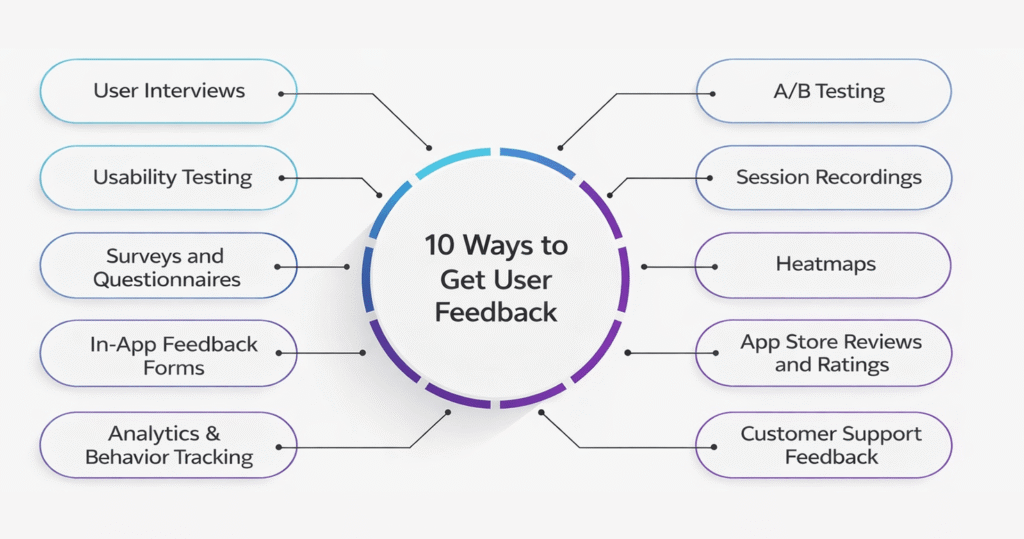
Direct Feedback
This is feedback you request from users. You control when, where, and how you collect it:
➔ Surveys give you structured data through different scoring methods. A Net Promoter Score (NPS) survey measures customer loyalty and enthusiasm. A Customer Satisfaction Score (CSAT) survey tracks satisfaction levels. A Customer Effort Score (CES) survey reveals how easy your product is to use. You can also ask open-ended questions to get qualitative insights that scores alone won’t capture.
➔ Interviews provide depth that surveys can’t match. One-on-one conversations or focus groups take more time to set up, but the quality feedback tells you about specific pain points your customers face. You can ask follow-up questions, observe non-verbal cues, and understand the emotions behind user decisions.
➔ User testing lets customers test new features before release. This creates a low-risk situation where you see how your target audience receives new offerings and what developments need to happen.
Indirect Feedback
This feedback comes to you without solicitation. Users share opinions through channels you monitor but don’t control:
➔ Social media conversations reveal what people think. Social listening tools pick up every mention of your brand on platforms like Facebook and Instagram. This data helps you assess satisfaction and gage loyalty.
➔ Online reviews on Google, Yelp, G2, and Amazon provide valuable insights. Customers who rate a company’s service as ‘good’ are 38% more likely to recommend it to others. Encourage reviews through incentives like gift cards or discount coupons.
Inferred Feedback
This category relies on behavioral data rather than statements. You derive insights by analyzing how users interact with your product:
➔ Heatmaps monitor webpage interactions and show where users click, how far they scroll, and what captures their attention. This information helps you craft better experiences.
➔ Behavioral analytics track browsing patterns, purchase habits, and usage statistics. Implicit feedback is abundant because it’s generated as users interact with your system. A click might indicate interest, but it could also result from curiosity or error, so you need to weight interactions appropriately.
➔ Why User Feedback Systems Are Essential to Grow
User feedback systems stimulate business growth in measurable ways. Without them, you’re making decisions based on guesses rather than evidence.
Feedback provides firsthand insights into how users interact with your product. It reveals usability issues and pain points that internal testing misses. Understanding customer needs and priorities lets you create more intuitive experiences, which boosts satisfaction and loyalty.
Customer feedback helps you identify areas to improve and optimize resources. By understanding which issues matter most to users, you allocate time and effort so. This maximizes efficiency and focuses your team on what drives results.
Feedback also stimulates breakthroughs. Users often suggest new features or improvements that keep your product competitive. These ideas can lead to solutions you might not have considered and promote continuous development.
Feedback acts as a compass to develop products. It will give your software relevance and aligns with what users need and want. Companies fueled by customer feedback develop products they know will sell faster and streamline development cycles.
Feedback boosts retention. When you identify and address needs, customers stick around longer. This loyal community becomes your biggest advocate and spreads positive word-of-mouth.
Feedback helps you keep up with trends by revealing what’s emerging. Companies that seek and analyze feedback are better positioned to respond and capture market opportunities.
Feedback reduces risk by helping you catch and address issues early. This prevents costly mistakes and reduces the chance of product failure. When users see their feedback reflected in your product, trust grows and promotes a sense of co-creation and shared ownership.
Key Components of Effective User Feedback Systems
Building effective user feedback systems requires specific components working together. Each element serves a distinct purpose to capture, analyze, and act on what users tell you.
➔ Multi-Channel Feedback Collection
Your users communicate through different platforms. Your system needs to meet them wherever they are. Multi-channel feedback collection gathers insights from surveys, social media, online reviews, email, phone calls, and in-app interactions. People have different priorities for sharing feedback, so this approach captures a wider range of customer opinions and experiences.
Companies using multiple channels see measurable results. Airbnb achieves over 70% response rates by sending post-stay surveys via both email and in-app notifications. Starbucks uses feedback kiosks in stores, which led to a 20% improvement in service speed. Zappos offers phone and live chat support options, resulting in a 30% increase in customer retention.
➔ User-Friendly Feedback Tools
The software you choose determines how people can share their thoughts. Look for platforms with easy-to-use interfaces that don’t require technical expertise to set up. Customization matters because feedback forms should match your brand and feel natural to users. Your tool should support various feedback types: surveys, customer effort scores, sentiment analysis, and open-ended responses.
You cannot negotiate on integration capabilities. The platform needs to connect smoothly with your CRM systems like Salesforce or HubSpot and analytics tools like Google Analytics. This creates richer insights and better customer relationship management.
➔ Anonymity Features
Anonymous feedback unlocks honest responses. Research shows that 74% of employees say they’d be more willing to give feedback if communication channels were anonymous. Anonymity increases psychological safety. People speak up without fear of judgment or negative consequences. This removes group bias and lets you measure opinions with accuracy.
Verify complete anonymity guarantees, data security compliance, and anti-spam protection when selecting anonymous feedback tools. The system should track responses without compromising user identity.
➔ Automated Response Mechanisms
Automation makes the way you collect and respond to feedback efficient. AI chatbots participate with users in natural conversations and ask specific questions based on their interactions with your product. You can send automated surveys via email, in-app prompts, or SMS at optimal times: right after a purchase or support interaction.
Salesforce created a feedback system where employees share thoughts via mobile app surveys anonymously and frequently. This automation provides immediate analytics and strengthens management to make evidence-based decisions with speed.
➔ Analytics and Reporting Dashboards
Dashboard reporting transforms complex feedback data into efficient visual points. You can explore data immediately, drill down into details, and access key metrics with interactive dashboards. Charts, graphs, and timelines display critical information on a single page. They cut out extraneous data while allowing deep exploration when questions arise.
These visual formats help all team members understand patterns with speed. Everyone stays on the same page with unified data views.
➔ Integration with Product Development Tools
Centralized platforms eliminate tool sprawl and fragmented data. The best user feedback systems connect to product development tools and create a single source of truth. Teams can tag and triage submissions, verify ideas before building them, and line up feedback with product roadmaps when feedback merges with platforms like Zendesk, Salesforce, or project management software.
This unified approach will give you feedback that doesn’t sit in isolation but flows into your development process. It closes the loop between what users say and what you build.
Building a User Feedback System Step by Step
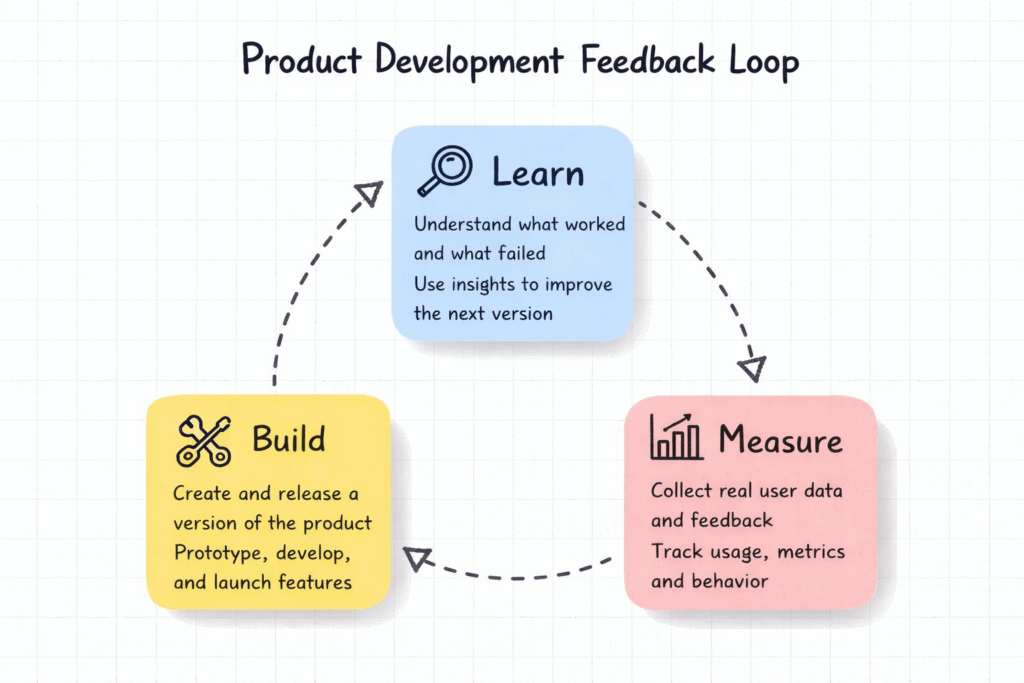
Creating user feedback systems that work starts with a structured approach. Each step builds on the previous one and moves you from concept to a functioning system that captures valuable insights.
➔ Identify Your Feedback Objectives
Define what you want to learn before seeking user feedback. Your objectives guide everything that follows. Do you need to understand overall satisfaction trends? Identify service issues frustrating customers? Uncover feature requests for product improvements? Your goals determine which channels work best and what questions lead to practical answers.
Establish measurable ways to track these goals. Product teams might focus on activation rates or user retention. Product marketers care most about qualified signups and usage metrics. Your KPIs help you form questions that yield the insights you need.
➔ Select Feedback Collection Methods
Match your feedback methods to practical realities. Budget and resources matter because some systems require time and investment. Analyze costs and secure leadership approval before committing. Company fit matters just as much. A small startup runs on informal methods like one-on-one meetings, while larger organizations benefit from structured surveys with analytics tracking.
Accessibility determines participation rates. Choose tools that work across devices with reasonable deadlines. Response rates climb higher when the process is easier.
➔ Design Feedback Forms and Surveys
Keep surveys short. Research suggests seven to ten questions is ideal and requires about 10 to 14 minutes to complete. To name just one example, single-question surveys work well for quick checks like “Was this page’s content helpful?” Mix question formats to maintain interest. Use multiple-choice for structured answers and rating scales for measuring satisfaction. Open-ended questions work best for detailed insights.
Communicate whether feedback stays anonymous and what information you’ll collect. Provide templates and clear instructions so participants give meaningful responses without confusion.
➔ Set Up Technical Infrastructure
Select platforms that unify feedback across channels. Tools like Airfocus, Trello, or Notion let you define workflows while connecting feedback data to your product backlog. Solid product tools manage both naturally and keep them from being separate, which creates inefficiency.
➔ Launch and Test Your System
Start small before rolling out company-wide. Test with specific teams or user segments to identify issues early. Communicate your system’s goals and reassure users that honest feedback is welcome and safe. Offer training resources so everyone understands how to participate.
Engagement Tactics That Bring Users Back
Getting users to provide feedback once is easy. Getting them to come back and participate repeatedly requires intentional tactics that show you value their input.
➔ Close the Feedback Loop Quickly
Speed matters when you respond to user feedback. Companies that close the loop within 48 hours experience a 6-point increase in Net Promoter Score and a 12% boost in retention. Users see their feedback guides action and become 21% more likely to respond to your next survey.
Send tailored follow-ups that reference what users told you and what action you took. Here’s an example: “Hi Sarah, you mentioned our notification settings were confusing. We’ve now added separate email and SMS toggles based on your suggestion.” This specific acknowledgment shows genuine listening rather than automated responses.
➔ Personalize Feedback Requests
Generic requests get ignored. Tailored subject lines can increase open rates by up to 50%. Address users by their preferred name and reference their recent purchase or interaction. Acknowledge their loyalty status. Airbnb sends feedback emails that address customers by name and mention their specific stay. Response rates climb by a lot.
➔ Reward and Recognize Active Contributors
Rewarding customers for feedback increases response rates by up to 50%. Customers who receive rewards are 25% more likely to remain loyal to your brand. Offer incentives like loyalty points or discount codes. You can also provide entry into sweepstakes. Starbucks asks for feedback after store pickups and offers gift card sweepstakes entries. Embrace Pet Insurance lets users reward customer service representatives directly with gifts and creates emotional connection.
➔ Make Feedback Collection Effortless
Complicated processes kill participation. Keep surveys short with a maximum of four targeted questions. Use in-app micro feedback forms that appear right after users interact with a feature. This captures thoughts while fresh. Send requests within 24 hours of customer contact to get accurate responses. Avoid bombarding users with requests after every minor interaction. This creates survey fatigue.
Common Mistakes to Avoid and Best Practices
User feedback systems fail when companies repeat the same preventable mistakes. You need to understand these pitfalls to build something sustainable.
➔ Avoiding Survey Fatigue
Survey fatigue happens when users grow tired of feedback requests and causes them to abandon surveys or skip them. 70% of people have abandoned a survey before completing it. Long surveys push customers away rather than make them participate. You should keep surveys under 10 minutes and focus on questions that matter.
Frequency matters just as much. Quarterly surveys work best for B2B audiences, whereas B2C frequency should match how often customers interact with you, multiplied by two. Survey every two months if customers participate monthly.
➔ Not Acting on Collected Feedback
You damage trust more by collecting feedback without action than by not asking. The penalties for ignoring user feedback can be substantial, whereas 77% of consumers view them more favorably when companies actively invite and accept feedback. Users will leave for good and become easy targets for competitors when suggestions disappear into a void.
➔ Overcomplicating the Feedback Process
Brief is better. Long, intricate surveys cause feedback fatigue. You should keep questions simple and direct so users understand what you’re asking. One or two open-text questions work well for deeper insights.
➔ Best Practices for Sustained Engagement
You can organize feedback by tagging items based on category. This makes searching and grouping similar feedback effortless. Automated email alerts help with urgent feedback requiring immediate attention. You must close the loop by letting customers know their opinions are valuable and showing what you’ve done with their input.
Conclusion
You now have everything you need to build user feedback systems that work. The key is simple: collect feedback through multiple channels and make the process effortless for users. Act on what they tell you.
Users will come back once they see their input matters. Close the loop fast, personalize your requests and reward active contributors. Keep things short and relevant to avoid survey fatigue.
Start small and test your system. Improve based on what you learn. Your users have valuable things to share. Give them an easy way to speak up and show them you’re listening. Watch engagement grow over time.
Key Takeaways
Building effective user feedback systems requires strategic design that prioritizes user experience and demonstrates genuine value for their input.
• Close the feedback loop within 48 hours to increase NPS by 6 points and boost retention by 12% • Keep surveys under 10 minutes with maximum 7-10 questions to avoid the 70% abandonment rate • Personalize feedback requests by name and recent interactions to increase open rates by 50% • Reward active contributors with incentives to boost response rates by up to 50% • Use multi-channel collection (surveys, social media, analytics) to capture diverse user perspectives • Act on collected feedback immediately – ignoring input damages trust more than not asking at all
The most successful feedback systems make participation effortless while proving that user voices directly influence product improvements. When users see their suggestions implemented, they become 21% more likely to provide future feedback, creating a sustainable cycle of engagement and product enhancement.
FAQs
Q1. What are the main types of user feedback I can collect for my product?
There are three main categories: Direct feedback (surveys, interviews, and user testing that you actively request), Indirect feedback (social media mentions, online reviews, and unsolicited comments), and Inferred feedback (behavioral data like heatmaps and analytics that reveal how users interact with your product). Each type provides different insights, so using a combination helps you understand the complete user experience.
Q2. How quickly should I respond to user feedback to maintain engagement?
Responding within 48 hours is ideal for maintaining strong user engagement. Companies that close the feedback loop this quickly see a 6-point increase in Net Promoter Score and a 12% boost in retention rates. When users see their feedback leads to timely action, they become 21% more likely to respond to future surveys.
Q3. What’s the optimal length for user feedback surveys?
Keep surveys to 7-10 questions, requiring about 10-14 minutes to complete. Research shows that 70% of people abandon surveys before finishing them, primarily due to length. Shorter, focused surveys respect users’ time and significantly improve completion rates while still gathering valuable insights.
Q4. How can I encourage more users to provide feedback?
Make the process effortless by keeping surveys short, personalizing requests with users’ names and recent interactions, and offering rewards like discount codes or loyalty points. Personalized subject lines can increase open rates by 50%, while incentives can boost response rates by up to 50%. Most importantly, show users that their feedback matters by implementing their suggestions and communicating what changes you’ve made.
Q5. What’s the biggest mistake companies make with user feedback systems?
The most damaging mistake is collecting feedback but not acting on it. This damages trust more than not asking for feedback at all. When suggestions disappear without acknowledgment or action, users disengage permanently and may turn to competitors. Always close the loop by showing users how their input influenced product decisions and improvements.