

Heuristic evaluation remains one of the most powerful tools in our UX arsenal, even as we approach 2026. I’m always amazed that these principles have remained unchanged since 1994, proving their timeless value in an industry that changes by the minute.
While the explainable AI market is projected to reach $33.2 billion by 2032 and 88% of business leaders plan to increase AI budgets, the fundamentals of good user experience haven’t budged. These usability heuristics, first developed by Rolf Molich and Jakob Nielsen in 1990, still guide our everyday design decisions. From visibility of system status to help and documentation, these 10 heuristic principles continue to serve as our go-to checklist for creating intuitive, user-friendly products. Despite all our technological advances, nearly a third of cybersecurity leaders have already implemented passwordless authentication with another 38% planning to follow suit – yet they still rely on these same core UX principles.
Let’s explore each of these time-tested heuristics and see why top designers still depend on them to create exceptional user experiences.
1. Visibility of System Status
The first heuristic I always check in any evaluation is system status visibility. It’s the digital equivalent of having a conversation – imagine talking to someone who never responds or acknowledges what you’ve said. Frustrating, right?
Definition
Visibility of system status means keeping users informed about what’s happening within an interface through appropriate feedback within a reasonable time. At its core, this principle is about communication and transparency between your product and its users. When users can clearly see the current system status, they can overcome the “gulf of evaluation” – understanding what’s happening and deciding what to do next.
The concept is straightforward: systems should communicate their state to users in language they understand. This creates predictability and builds trust not just in the interface but in the brand itself. As Alan Cooper wisely put it, “If we want users to like our software, we should design it to behave like a likable person: respectful, generous, and helpful”.
Example
We encounter this heuristic daily in both digital and physical worlds:
→ Amazon’s cart interaction shows multiple status indicators: a bottom sheet confirmation appears, the “Add to cart” button changes state, and the cart icon updates with the item count.
→ Google Chrome tabs display different states – loading animations around favicons for processing pages and speaker icons for tabs playing audio.
→ YouTube ads show count (1 of 2), time remaining, and when you can skip – keeping you informed and in control.
→ Your car’s speedometer continuously shows your speed so you can decide to go faster or slower – driving with a broken speedometer demonstrates how lack of status information equals lack of control.
→ Instagram labels “Suggested posts” to maintain transparency and user trust.
Tips
When implementing this heuristic in your designs, consider these dimensions:
→ Timing: Provide immediate feedback for interactive events. Sometimes a brief message is sufficient; other times, you’ll need to show processing states and final outcomes.
→ Clarity: Go beyond icons – include concise text to clarify status, especially for critical functions.
→ Obtrusiveness level: Match feedback intensity to the action’s importance. Some actions deserve unobtrusive indicators; others require attention-demanding dialogs.
→ Proximity: Place status updates near the triggering action when possible.
→ Paired actions: Consider including undo options with status updates for destructive changes.
→ Feedback types: Use appropriate visual indicators – loading animations, progress bars, color changes, or microcopy. For mobile experiences, consider haptic feedback.
→ Selective transparency: Not all backstage information needs sharing, but certain backend states (like low inventory or server status) can improve the user experience.
Remember: a lack of information often equals a lack of control. Every successful interaction between users and your system depends on clear, timely communication about what’s happening.
2. Match Between System and the Real World
The second heuristic principle focuses on the connection between digital interfaces and our everyday lives. Whenever I evaluate a product, I check how well it mirrors real-world concepts that users already understand.
Definition
This principle states that systems should speak the users’ language with words, phrases, and concepts familiar to them, rather than using technical jargon. Essentially, digital experiences should reflect what users already know from their physical world experiences.
When users interact with any system, they form a mental model—an internal representation of how they believe that system works. These models, built from past experiences and interactions, guide their expectations and predict how the system will behave.
The strength of this heuristic lies in its recognition that humans naturally seek familiar words, concepts, shapes, and images to understand and make decisions. If a user’s mental model doesn’t align with your product, they’ll feel ignored and might choose a competitor’s solution instead.
Example
I’ve seen numerous excellent implementations of this principle:
→ Recycle Bin in Windows mimics a real-world trash container, making its function immediately clear
→ Folder icons resemble physical folders we’ve used for decades
→ E-commerce shopping carts transfer our understanding of physical shopping to online stores
→ iPhone compass app functions just like its physical counterpart
→ Notes app with paper-like texture creates an immediate connection to physical notebooks
Conversely, poor implementations create confusion. The U.S. Customs and Border Protection website places notifications out of logical order and uses technical acronyms that most users wouldn’t understand.
Tips
To effectively implement this heuristic in your designs:
→ Use metaphors thoughtfully – They reduce cognitive load and accelerate understanding by mapping multiple attributes between familiar concepts and new interfaces
→ Consider cultural context – Each culture has established metaphors that should influence interface design (like associating “more” with “up” in Western cultures)
→ Create natural mappings – Follow users’ expectations to make tasks intuitive without requiring memorization
→ Focus on feelings – Match not just words and objects but also how digital experiences make users feel compared to their real-world counterparts
→ Use familiar icons – Even as we’ve moved from skeuomorphic to flat design, maintaining familiar shapes helps users connect interfaces to real objects
→ Test with actual users – Never assume your interpretation of words or objects matches your users’ understanding
Furthermore, this heuristic creates trust. When an interface speaks the user’s language and follows real-world conventions, it demonstrates empathy—showing that the system knows its users and cares about them.
3. User Control and Freedom
When users feel trapped in a digital experience, frustration quickly follows. The third heuristic principle addresses this fundamental need for autonomy in our interactions with technology.
Definition
User control and freedom refers to giving users the ability to easily exit unwanted states without going through lengthy processes. This principle acknowledges that people frequently perform actions by mistake and need clearly marked “emergency exits” to recover from errors. When interfaces support these escape routes, users develop a sense of confidence and freedom to explore.
Additionally, this freedom reduces anxiety – a common issue in UX design that stems from users’ fear of making irreversible mistakes. By offering clear control mechanisms, we empower users to navigate freely and experiment without apprehension.
Nielsen’s heuristic evaluation guidelines emphasize that this control fosters trust, increases user satisfaction, and ultimately improves retention rates. Moreover, interfaces that respect user autonomy demonstrate empathy and understanding of human behavior.
Example
In daily digital experiences, we encounter numerous implementations of this principle:
→ Browser back buttons that allow users to return to previous pages (though some sites disable this function, creating immediate frustration)
→ Undo/Redo options in text editors that let users reverse unintended actions without losing work
→ Cancel links in multi-step processes like online purchases or form submissions
→ Close buttons (X) for overlays and lightboxes that provide quick escape routes
→ Confirmation dialogs for significant actions like deleting content or logging out
A poor implementation might trap users in checkout flows without exit options or create interfaces where actions cannot be reversed – leaving users feeling helpless and frustrated.
Tips
To effectively implement this heuristic in your designs:
→ Position exit points where users expect them – like X icons in the upper right corner of overlays
→ Support both browser back buttons and in-application back links
→ Use universal icons with text labels (prefer “Cancel” over just an X)
→ Offer multiple levels of Undo/Redo for complex interactions
→ Make control elements clearly visible rather than hidden (avoid shake-to-undo and other non-discoverable patterns)
→ Test your exit flows with real users to identify pain points
→ Balance user freedom with simplicity – too many options can overwhelm users
Remember that exit flows should be intuitive, ethical, and seamless. During usability heuristic evaluation, pay particular attention to how users can escape from unwanted states, as this dramatically impacts their overall experience and willingness to engage with your product.
4. Consistency and Standards
Consistency in design creates a foundation of user trust that no other heuristic principle can replace. As a fourth key principle in Nielsen’s heuristic evaluation framework, consistency ensures users aren’t forced to relearn interfaces as they navigate.
Definition
Consistency and standards in UX design refer to maintaining uniformity within your product (internal consistency) as well as adhering to established conventions users have experienced elsewhere (external consistency). Internal consistency relates to using the same patterns throughout a product or family of products, whereas external consistency follows web, platform, and industry-specific conventions.
Following this principle means users don’t need to wonder if different words, actions, or interface elements mean the same thing. In fact, maintaining brand consistency across platforms can boost revenue by up to 23%. This happens because consistent branding builds trust, with approximately 46% of customers willing to pay more for products from brands they trust.
Example
The effectiveness of consistency appears in everyday digital experiences:
→ Successful implementations: Companies like Starbucks demonstrate powerful consistency by maintaining their iconic siren imagery across all touchpoints, creating instant recognition even after removing the word “coffee” from their logo in 2011. Similarly, Netflix maintains a unified brand voice across platforms that resonates with audiences.
→ Poor implementations: The Xfinity website provides a negative example where both primary and secondary menu bars differ significantly between pages, creating confusion as each page feels like a different website entirely. Another poor example is BBC’s comment section, which used south-facing arrows to indicate “highest rated” comments – contradicting the mental model that “higher” is associated with upward direction.
Tips
To effectively implement consistency in your designs:
→ Create a design system as your single source of truth for how components should look and behave across products
→ Maintain language consistency in both terminology and tone – different terms for the same function create immediate confusion
→ Follow established conventions for layout elements like placing logos in the top left and search fields in the top right
→ Limit your palette to 2-3 primary colors consistent across all channels
→ Use UI elements as originally defined – radio buttons for single selections and checkboxes for multiple selections
→ Conduct regular design reviews involving representatives from multiple design teams to identify inconsistencies
→ Include content standards alongside visual components in your design system to ensure messaging consistency
Remember that consistency isn’t about making everything identical; it’s about creating predictable patterns that allow users to apply knowledge from one area to another without relearning interfaces. Consequently, this reduces cognitive load and builds the confidence that keeps users returning to your product.
5. Error Prevention
Even the best users make errors. The fifth heuristic principle in Nielsen’s framework acknowledges this reality and focuses on preventing problems before they happen.
Definition
Error prevention means designing interfaces that stop errors from occurring in the first place. This approach is always preferable to even the most well-crafted error messages. In UX design, we recognize two distinct types of errors: slips and mistakes.
Slips happen when users intend to do one thing but accidentally do another—like typing errors or clicking the wrong button. These typically occur when users are on autopilot. Mistakes, meanwhile, happen when users have incorrect goals or misunderstand how a system works. The distinction matters because each requires different prevention strategies.
Notably, the term “user error” itself is misleading. When errors occur, it’s rarely the user’s fault—it’s a design failure. The responsibility falls on designers to create systems that reduce error possibilities.
Example
Error prevention exists throughout our digital experiences:
→ Microsoft’s Recycle Bin allows recovery of accidentally deleted files
→ Gmail’s “Undo Send” feature gives users seconds to reconsider after sending an email
→ Bewakoof’s payment form automatically formats card numbers, preventing format errors
→ Mailchimp requires typing “DELETE” to confirm deleting an email campaign
→ Best Buy’s checkout page implements input formatters that only accept appropriate characters
Poor implementation examples include forms without input validation, destructive actions without confirmation steps, or complex processes without progress indicators.
Tips
To incorporate this heuristic into your designs:
→ Use constraints where appropriate—limit options when there are clear rules about what’s acceptable
→ Offer suggestions through features like autocomplete to prevent typing errors
→ Provide good defaults that match likely user goals to minimize input errors
→ Show preview states before finalizing important actions
→ Implement confirmation dialogs for irreversible operations
→ Use inline validation to catch errors as they happen rather than after form submission
→ Remove memory burdens by not requiring users to remember information between screens
→ Create input formatters that automatically correct common input errors
First and foremost, remember that prevention beats correction. According to Norman’s design principles, the solution to user errors isn’t more training—it’s redesigning systems to be less error-prone. Throughout heuristic evaluation, examining how interfaces prevent potential errors often reveals the most significant opportunities for improvement.
6. Recognition Rather than Recall
Memory plays a critical role in how we interact with digital products. The sixth heuristic principle addresses this by focusing on making interfaces recognize rather than recall-dependent.
Definition
Recognition rather than recall refers to minimizing users’ memory load by making objects, actions, and options visible. Fundamentally, this principle acknowledges the difference between two types of memory retrieval: recognition (identifying something familiar) versus recall (remembering information without prompts).
Recognition happens when you spot something you’ve seen before—like a familiar icon or menu item. This process requires less mental effort because your brain simply matches what you see to existing knowledge. Recall, however, demands more cognitive work as your brain must retrieve information independently—like remembering a password without hints.
Jakob Nielsen’s original guideline states: “Minimize the user’s memory load by making visible objects, actions, and options. The user should not have to remember information from one part of the dialog to another”. Primarily, this principle aims to reduce the mental burden interfaces place on users.
Example
This heuristic appears throughout our daily digital experiences:
→ Shopping cart icons instantly signal checkout functionality across e-commerce sites
→ Standard icons like magnifying glass for search help users recognize functions immediately
→ Autocomplete in search bars transforms recall tasks into recognition ones
→ “Recently viewed” sections help users continue tasks without remembering where they left off
→ Face ID lets you recognize your home screen layout without recalling specific steps
Tips
To effectively implement this principle:
→ Use clear, familiar interfaces with common design patterns
→ Provide visual cues that guide users to relevant actions
→ Implement progressive disclosure to present only necessary information
→ Offer predictive input and suggestions based on user behavior
→ Include tooltips and inline hints for contextual guidance
→ Maintain consistent navigation across pages to reduce learning requirements
→ Show recent activity and history to help users resume incomplete tasks
Thoughtfully designed products ultimately succeed by reducing unnecessary mental load on users. When interfaces prioritize recognition over recall, they feel more intuitive, requiring less effort to navigate and use effectively.
7. Flexibility and Efficiency of Use
Designing interfaces that serve both novices and experts creates a delicate balancing act. The seventh heuristic focuses on making systems adaptable to different user needs without sacrificing usability.
Definition
Flexibility and efficiency of use refers to creating interfaces that cater to both inexperienced and experienced users through shortcuts and accelerators. This principle recognizes that new users require clear guidance while experienced users want faster ways to complete familiar tasks.
The fundamental challenge lies in balancing learnability with efficiency. Novice users need obvious options and step-by-step wizards until they develop a mental model of how the system works. Experienced users, once comfortable with the basics, seek ways to work more efficiently without unnecessary handholding.
Accelerators—secondary methods for accomplishing the same tasks more quickly—form the heart of this principle. These shortcuts remain invisible to novices while offering experts ways to speed up interactions.
Example
Real-world implementations of this principle appear throughout our digital landscape:
→ Keyboard shortcuts for common actions like copy (Ctrl+C) and paste (Ctrl+V) provide faster alternatives to menu navigation
→ Slack’s Quick Switcher (Cmd/Ctrl+K) offers an efficient channel navigation method alongside the more visible sidebar
→ Mobile keyboard gestures allow swiping across letters rather than tapping each one individually
→ Notion’s modular workspace adapts to different user needs with customizable blocks
→ Amazon’s streamlined checkout minimizes steps for common tasks while maintaining detailed options
Tips
To implement this heuristic effectively in your designs:
→ Create multiple paths to accomplish the same task based on user expertise levels
→ Place keyboard shortcuts next to menu commands to support learning
→ Implement role-based customization to show only tools relevant to specific users
→ Use progressive disclosure to introduce features gradually
→ Enable customizable toolbars and settings for power users
→ Provide smart defaults and pre-filled inputs to reduce effort
→ Implement autocomplete and predictive features to speed up interactions
Primarily, remember that flexibility isn’t about duplicating functionality everywhere—it’s about thoughtful implementation of accelerators that don’t overwhelm novices yet satisfy experts. Through continuous testing with both user groups, you’ll find that sweet spot between simplicity and power.
8. Esthetic and Minimalist Design
“Good design is obvious. Great design is transparent.” — Jeffrey Veen, UX pioneer and founder of Adaptive Path
Visual clutter remains the enemy of effective user experience in 2026. The eighth heuristic principle in Nielsen’s framework addresses how cleanliness in design impacts usability just as much as functionality.
Definition
Esthetic and minimalist design means interfaces should not contain irrelevant information. Every extra element competes with the relevant ones and diminishes their visibility. This principle focuses on maximizing the “signal” (elements with high informational value) while minimizing the “noise” (elements with low informational value).
A critical misconception persists about this heuristic: minimalist design doesn’t simply mean removing elements—it means including all necessary elements to support user tasks. The goal is maximizing utility with just enough elements on the page, as too few would inhibit functionality while too many obscure important content.
Example
Several modern applications exemplify this principle successfully:
→ ADA healthcare app uses white space effectively with illustrations that highlight symptoms users experience
→ Dollar Shave Club employs a cream-colored background that’s easy on the eyes alongside emphasized text for clarity
→ Habitify integrates simple animations and uncluttered screens that encourage immediate action
Tips
→ Utilize visual design principles for effective communication
→ Progressively disclose features rather than showing everything at once
→ Leverage universal visual patterns that carry positive connotations (rounded shapes, vibrant colors)
→ Remember cultural differences affect what users find visually appealing
→ Design specifically for your priority personas
Primarily, remember that attractive interfaces benefit from the esthetic-usability effect—users perceive beautiful products as more usable and become more tolerant of minor issues.
9. Help Users Recognize, Diagnose, and Recover from Errors
Error messages represent crucial touchpoints where users need the most support. The ninth heuristic tackles how to transform these frustrating moments into helpful interactions.
Definition
Error recovery in UX design refers to helping users recognize, diagnose, and recover from errors they encounter while using an interface. This heuristic emphasizes that effective error messages must present themselves noticeably to users and provide clear guidance. At its core, error recovery is about empathy—when users face problems, they should never feel lost, frustrated, or blamed.
Example
→ Good Example: Elevator error message stating “Door stuck? Press the emergency button and wait for assistance.” This clearly identifies the problem and offers a solution.
→ Poor Example: Vending machine displaying only “Out of Order” without explaining why or offering alternatives.
→ Email Applications: Modern email apps detect when you mention attachments but forget to include them, prompting you before sending.
Tips
→ Display errors close to their source to reduce cognitive load.
→ Use human-readable language instead of technical jargon or error codes.
→ Take a positive tone that doesn’t blame users with terms like “invalid” or “incorrect”.
→ Preserve user input so people can edit their original action rather than starting over.
→ Differentiate error severity through appropriate visual treatment—use modal dialogs only for serious errors, whereas toast notifications work for minor issues.
→ Offer specific solutions whenever possible, not just problem statements.
→ Time errors appropriately—avoid premature messages that appear before users finish their inputs.
Error recovery isn’t just about fixing problems; it’s an opportunity to build trust with users through respectful guidance.
10. Help and Documentation
Users need a safety net regardless of how intuitive your interface is. The tenth heuristic emphasizes providing help for those inevitable moments of confusion.
Definition
Help and documentation serve as on-demand user guides that provide assistance precisely when needed. Unlike traditional manuals, effective UX documentation is contextual—delivered within the product experience without disrupting workflow. This heuristic recognizes two distinct approaches: reactive help that answers questions after problems arise, plus proactive guidance that prevents confusion before it happens.
Example
→ Notion’s help widget offers minimal disruption with a simple question mark icon that connects users directly to support resources
→ Chameleon’s HelpBar improves knowledge base search functionality by analyzing user behavior and highlighting popular resources
→ Contextual tooltips in StarUML explain diagram creation directly over the interface, reducing memory load by eliminating the need to switch between help pages and the application
Tips
→ Create documentation that’s discoverable and self-explanatory for when it’s needed
→ Keep help content short & painless so teams don’t spend hours navigating documentation
→ Maintain one source of truth for project milestones and decisions
→ Design help that’s useful, relevant, unintrusive, specific, and understandable
→ Optimize documentation for scanning with clear visual hierarchy and highlighted keywords
Conclusion
These 10 heuristic principles show us why good design fundamentals never go out of style. Despite all our technological advances since 1994, users still need clear status updates, familiar mental models, and freedom to navigate without feeling trapped.
Time has proven Nielsen’s framework incredibly durable. My years evaluating products have taught me that skipping these principles leads to frustrated users and failed products. Think about your favorite apps and websites – they probably follow most of these guidelines without you even noticing.
What makes these heuristics special? Their focus on human behavior rather than specific technologies. People still want interfaces that:
➡️ Tell them what’s happening ➡️ Speak their language ➡️ Let them escape mistakes ➡️ Stay consistent across screens ➡️ Prevent errors before they happen
Modern interfaces may look different from those in the 1990s, but our brains work the same way. Users still prefer recognition over recall. They appreciate both simplicity for beginners and shortcuts for experts. Clean, focused designs still communicate better than cluttered ones.
Your next project deserves the benefit of these time-tested principles. Start with a heuristic evaluation before jumping into new designs. You’ll catch problems early and build experiences users actually enjoy using.
Thirty years have passed since these guidelines first appeared, yet they remain the foundation of good UX design. AI may assist our design process, but human psychology hasn’t changed – and neither has our need for interfaces that respect how people actually think and behave.
Key Takeaways
Nielsen’s 10 UX heuristic from 1994 remain the gold standard for creating user-friendly interfaces, proving that good design principles transcend technological changes.
• Always keep users informed – Provide immediate feedback for actions and clear system status to build trust and reduce anxiety • Design for human psychology, not technology – Use familiar language and real-world concepts that match users’ existing mental models • Give users control and escape routes – Include undo options, back buttons, and clear exit paths to build confidence and reduce fear of mistakes • Maintain consistency across all touchpoints – Create design systems that follow established conventions to reduce cognitive load and learning curves • Prevent errors before they happen – Use constraints, confirmations, and smart defaults rather than relying on error messages after problems occur • Make interfaces recognizable, not memorable – Show options visually instead of requiring users to recall information from memory
These principles work because they address fundamental human behavior patterns that haven’t changed despite decades of technological evolution. Whether you’re designing for AI-powered interfaces or traditional web apps, users still need clear communication, familiar patterns, and respectful error handling to feel confident using your product.
FAQs
Q1. What are the 10 heuristics of UX design?
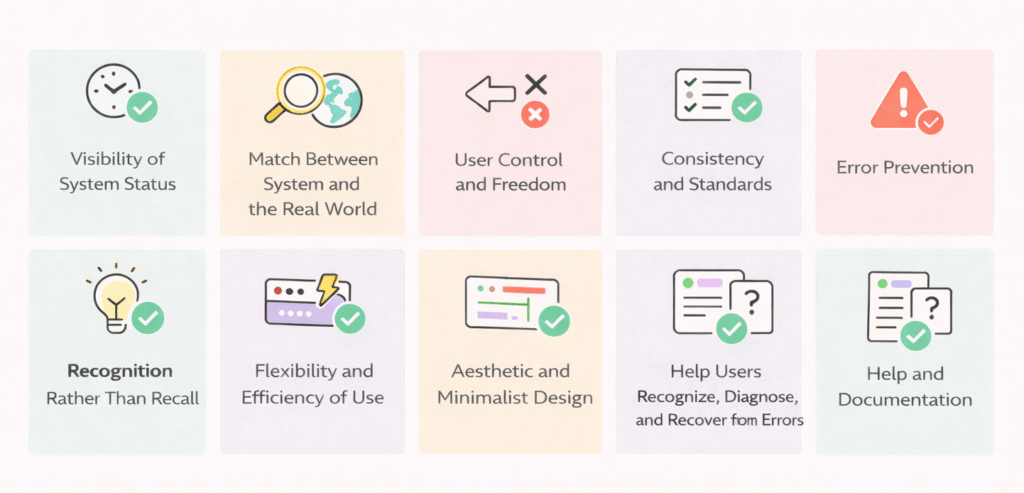
The 10 usability heuristics are: visibility of system status, match between system and real world, user control and freedom, consistency and standards, error prevention, recognition rather than recall, flexibility and efficiency of use, esthetic and minimalist design, help users recognize and recover from errors, and help and documentation.
Q2. How do UX heuristics benefit designers in 2026?
UX heuristics continue to provide a timeless framework for creating user-friendly interfaces. They help designers focus on fundamental human behavior patterns, ensuring products remain intuitive and enjoyable to use despite technological advancements.
Q3. Why is consistency important in UX design?
Consistency in design creates a foundation of user trust and reduces cognitive load. It helps users navigate interfaces more efficiently by applying knowledge from one area to another without having to relearn how things work.
Q4. How can designers implement error prevention in their products?
Designers can implement error prevention by using constraints where appropriate, offering suggestions through features like autocomplete, providing good defaults, showing preview states before finalizing important actions, and implementing confirmation dialogs for irreversible operations.
Q5. What is the difference between recognition and recall in UX design?
Recognition refers to the ability to identify something familiar, like a common icon, which requires less mental effort. Recall, on the other hand, involves remembering information without prompts, which demands more cognitive work. UX design should prioritize recognition over recall to reduce users’ mental load.