
Have you ever hesitated before clicking a button because you weren’t sure what would happen next? That split second of confusion is exactly what microcopy is designed to eliminate. As a matter of fact, users who encountered well-crafted microcopy were more likely to upgrade their benefits, while error rates and click times both decreased.
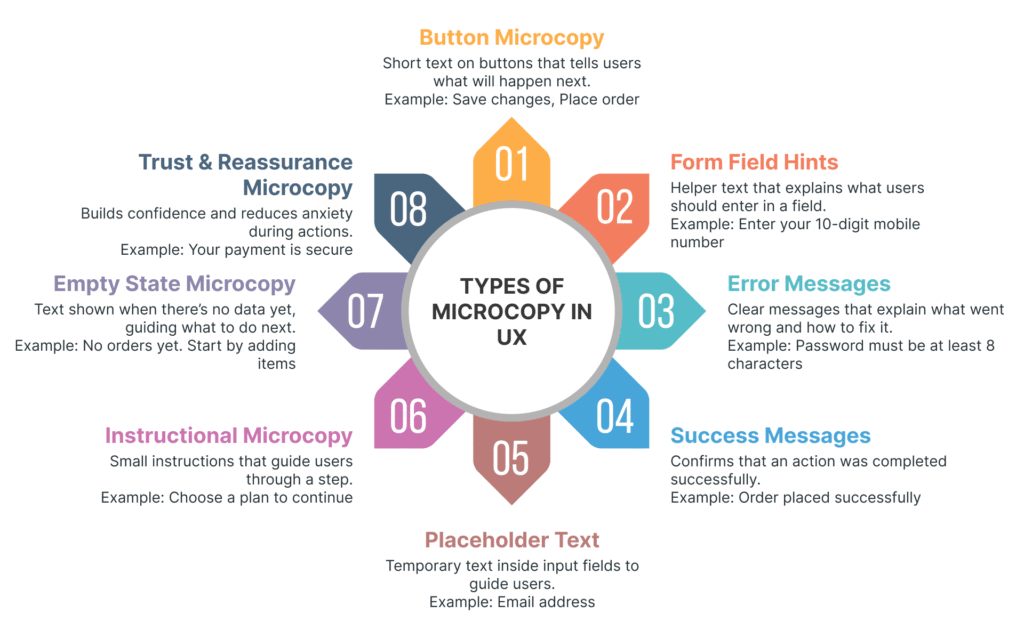
So what is microcopy? In essence, microcopy refers to those small pieces of text that guide users through your product: button labels, form hints, error messages, and tooltips. This UX microcopy in action turns confusion into clarity and hesitation into confident clicks.
In this guide, we’ll show you how to write microcopy that helps users take action without second-guessing themselves, with real microcopy examples you can apply right away.
Understanding Microcopy and Its Role in User Action
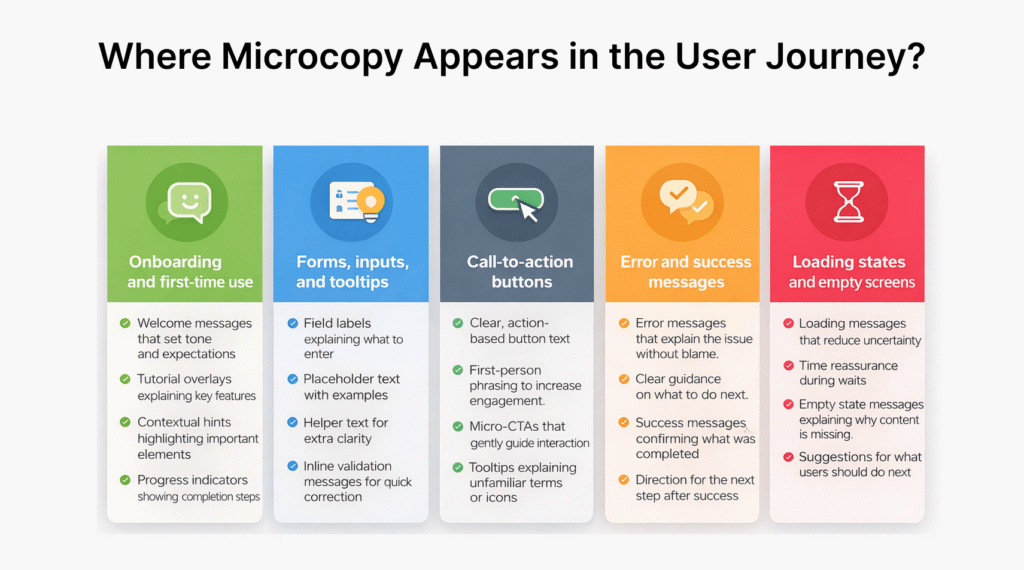
→ What is microcopy and where it appears
Microcopy meaning goes beyond simple interface text. These are the small text snippets that guide users through websites, apps, and other digital experiences. Rather than decorative copy, microcopy in UX is instructional and functional, appearing precisely at points of friction.
You encounter microcopy constantly. Button labels like “Add to Cart” versus “Get Yours Now” create different user responses. Form helper text such as “Use at least 8 characters” sets clear expectations. Error messages can either frustrate or guide, depending on how they’re written. Success confirmations, tooltips explaining features, loading messages, and empty states all fall under the microcopy umbrella.
What makes UX microcopy unique is its proximity to the point of conversion. While headlines and body copy set context, microcopy appears at the exact moment users need to make decisions. A password field showing “Your CVV is the 3-digit code on the back of your card” removes uncertainty right when users need it most.
→ How small words create big impacts
Small changes in microcopy produce measurable results. When Veaam changed their call-to-action from “Request a quote” to “Request pricing” based on user feedback, conversions increased by 166.66%. The same visuals, same targeting, just better microcopy can lift click-through rates by 18%.
The psychological impact runs deep. Microcopy reduces cognitive load, the mental effort required to complete tasks. Users are 50% more likely to complete tasks when they receive clear guidance through microcopy. Instead of “Submit,” a button reading “Get my free guide” communicates benefit immediately, lowering mental effort and increasing action likelihood.
Buffer’s simple question “What do you want to share?” creates a personal connection that makes the software feel less generic. Shopify includes “You can change your store name afterwards” in their signup form, calming the internal voice asking “What if I pick the wrong name?”. These seven words address anxiety before it derails conversion.
→ The connection between clarity and conversion
Hidden costs are the number one reason people abandon shopping carts. Adding “no additional costs” next to the total removes this concern proactively. Similarly, 80% of shoppers worry about credit card fraud. Microcopy stating “Your payment is secure” or “We’ll never share your email” removes hesitation at critical moments.
Clear microcopy builds trust through transparency. When Apple users refused to provide phone numbers during checkout, the solution wasn’t removing the field. Users became more forgiving when microcopy explained why the information was necessary. This principle applies across sensitive actions like data submission, payments, and identity verification.
Core Principles for Action-Oriented Microcopy
→ Be clear before being clever
Clever copy gets compliments, but clear copy gets conversions. When faced with the choice between witty wordplay and straightforward messaging, pick clarity every time. “Unlock the potential of human optimization” sounds impressive but means nothing. “Boost your energy, focus, and mood in 15 minutes a day” tells users exactly what they get.
Your microcopy isn’t poetry. Users scan fast, catching only the first word or two of each sentence. If they need to interpret your message, you’ve already lost them. “Proceed” leaves users guessing, while “Submit for Verification” sets clear expectations.
→ Anticipate user questions and concerns
Effective microcopy answers questions before users ask them. Sara Walsh doubled the word count on a Capital One form by adding helper text around fields. The form completion rate tripled from 26% to 92%. Those extra words eliminated confusion about what to enter.
Users worry about privacy when sharing phone numbers or birth dates. Tell them why you need this information. When asking for personal data, explain “We’ll text you order updates” or “We never share your information with third parties”.
→ Use natural conversational language
Write how humans talk, not how computers process information. Use positive contractions like “we’ll” and “you’re” to sound human. Avoid “Invalid input detected” and write “Please enter a valid phone number” instead.
Conversational doesn’t mean casual or sloppy. Even financial institutions benefit from friendly language. Users described conversational bank copy as “approachable” and “trustworthy” while formal versions felt “dull” and “intimidating”.
→ Match tone to context and user emotion
Your tone should shift based on what users are experiencing. Government portals require formal, reassuring language. Health apps need calm, empathetic tones. Error messages demand different treatment than success confirmations.
→ Focus on user benefit not system function
Features describe what your product does. Benefits explain what users gain. Don’t write “A/B test your subject lines.” Write “Get 20% higher open rates”. Replace “Files stored and categorized automatically” with “No more time wasted searching through folders”.
Microcopy Examples Across Key User Touchpoints
Microcopy works differently depending on where users encounter it. The same principles apply across touchpoints, but execution varies based on context.
→ Sign up and onboarding flows
First impressions start with your signup page. Instead of “Log In,” write something that shows you’re happy to see returning users. Explain why signing up matters: “Create an account to track orders, save favorites, and get exclusive deals.” Spotify addresses free trial anxiety upfront with “No credit card needed,” removing the main barrier to signup.
→ Form fields and data entry
Helper text prevents errors before they happen. Mailchimp shows real-time password strength as users type, graying out requirements once met. When asking for phone numbers, Modcloth explains “We’ll only use this to contact you about your order.” Placeholder examples work in search fields, while questions guide input: “What are you looking for?”
→ Calls to action and navigation
Button text should describe the outcome, not the action. “Get my free guide” beats “Submit.” Grammarly’s homepage button reads “Add to Chrome – It’s free,” combining action with reassurance in five words.
→ Error handling and troubleshooting
Error messages need three elements: what happened, why, and how to fix it. Skip “Invalid input” for “Please enter a valid email address like name@email.com.” Github prompts users to “try refreshing the page or contact support” when errors occur.
→ Confirmation and success states
Success messages can guide next steps. After completing a task, Asana celebrates with “You just got one step closer to taking over your to-do list.”
→ Empty states and first-time experiences
Empty screens are opportunities, not dead ends. Dropbox Paper’s empty state reads “Get started by creating a doc” with a clear action button. Instacart’s no-results page tells users what happened, suggests alternatives, and explains how they’re improving search for next time.
Testing and Improving Microcopy
Writing microcopy is just the starting point. Testing reveals whether your words actually work.
→ How to evaluate if your microcopy works
Watch real users interact with your product. Usability testing shows where people hesitate, what questions they ask out loud, and which words confuse them. Run remote sessions where users complete tasks while you observe through screen sharing. Listen for sighs or frustrated comments. These signal friction points needing better microcopy.
Track specific metrics → click-through rates show if buttons work, form submissions reveal if helper text prevents abandonment, bounce rates indicate if users stay engaged. Users who saw improved empty state microcopy were more likely to upgrade, while error rates decreased.
→ Common microcopy mistakes to avoid
Don’t set it and forget it. Test different versions, especially for key calls-to-action and form fields. Without testing, you produce poor content that doesn’t benefit users. Run tests with actual customers, not just your team. Iterate based on what you learn.
→ A/B testing for better user outcomes
Test one element at a time for accurate results. StubHub changed a confusing “See Details” link to a simple “Go” button, resulting in a 2.6% conversion jump and millions in additional revenue. Compare versions simultaneously with large user samples. Measure form abandonment rates, conversions, and user behavior patterns to identify winners.
Conclusion
You now have everything you need to write microcopy that guides users instead of confusing them. Small words create big results, especially when you focus on clarity over cleverness.
Start by reviewing your buttons, forms, and error messages today. Test different versions and watch how users respond. Remember, microcopy works best when it answers questions before users ask them.
Keep it simple, keep it human, and your conversion rates will thank you.
Key Takeaways
Effective microcopy transforms user hesitation into confident action by providing clear guidance at critical decision points throughout digital experiences.
• Prioritize clarity over cleverness – Clear microcopy converts better than witty wordplay; users need straightforward guidance, not interpretation puzzles.
• Anticipate user concerns proactively – Address privacy worries, explain data requirements, and remove friction before users encounter confusion or doubt.
• Test and measure microcopy performance – A/B test button text, form helpers, and error messages to identify what actually drives conversions and reduces abandonment.
• Match tone to user context and emotion – Adapt your language based on user state, from reassuring during errors to celebratory during success moments.
• Focus on user benefits, not system functions – Write “Get 20% higher open rates” instead of “A/B test your subject lines” to show value clearly.
Small text changes can produce dramatic results – companies have seen conversion increases of 166% and form completion rates jump from 26% to 92% simply by improving their microcopy. The key is writing like a helpful human, not a computer system.
FAQs
Q1. What exactly is microcopy in user experience design?
Microcopy refers to brief, helpful text snippets that appear throughout digital interfaces like websites and apps. These short sentences or phrases serve practical purposes—guiding users on what to do next, answering common questions, addressing concerns, and providing context at critical decision points. Examples include button labels, form helper text, error messages, and tooltips.
Q2. How can I make my microcopy more accessible to all users?
Use live text instead of images whenever possible, as screen readers can easily interpret text but struggle with image-based copy. If you must use images for microcopy, ensure the ALT text is clear, concise, and conveys the exact information users need. This creates a better experience for users relying on assistive technologies.
Q3. What helps organize content so users can easily navigate and find information?
Information architecture organizes content to make digital products easy to understand and navigate. It provides a clear layout and structure that helps users understand where they are within a product and quickly locate the information they’re seeking, whether in apps, websites, or blog posts.
Q4. Should I prioritize clever or clear language in my microcopy?
Always prioritize clarity over cleverness. While witty copy might earn compliments, clear copy drives conversions. Users scan quickly and need straightforward messaging they can understand immediately. If users need to interpret your message, you’ve already lost their attention and potentially their action.
Q5. How can I test whether my microcopy is actually working?
Conduct usability testing by watching real users interact with your product, noting where they hesitate or express confusion. Track metrics like click-through rates, form completion rates, and bounce rates. Run A/B tests comparing different microcopy versions, testing one element at a time with actual customers to identify what drives better user outcomes.