

UX metrics like task success rate can show improvement ranges from -9% to 271% across real-world redesigns, yet many teams still struggle to connect these numbers to actual business growth. As a matter of fact, research shows that increasing customer retention by just 5% can boost profits by 25% to 95%. The challenge isn’t collecting data; it’s knowing how to measure UX metrics that genuinely matter and proving their downstream business impact.
In this guide, we’ll walk you through the essential ux design metrics that drive measurable growth, practical frameworks for tracking ux performance metrics effectively, and ux metrics examples you can implement immediately. Specifically, you’ll learn which ux metrics to track for your product type and how to build a strategy that connects user experience improvements directly to revenue and retention.
Understanding UX design metrics and their business impact
UX metrics fall into two fundamental categories that reveal different aspects of user experience. Understanding this distinction helps you measure what genuinely drives business outcomes rather than chasing numbers that look good on paper.
Behavioral metrics: what users do
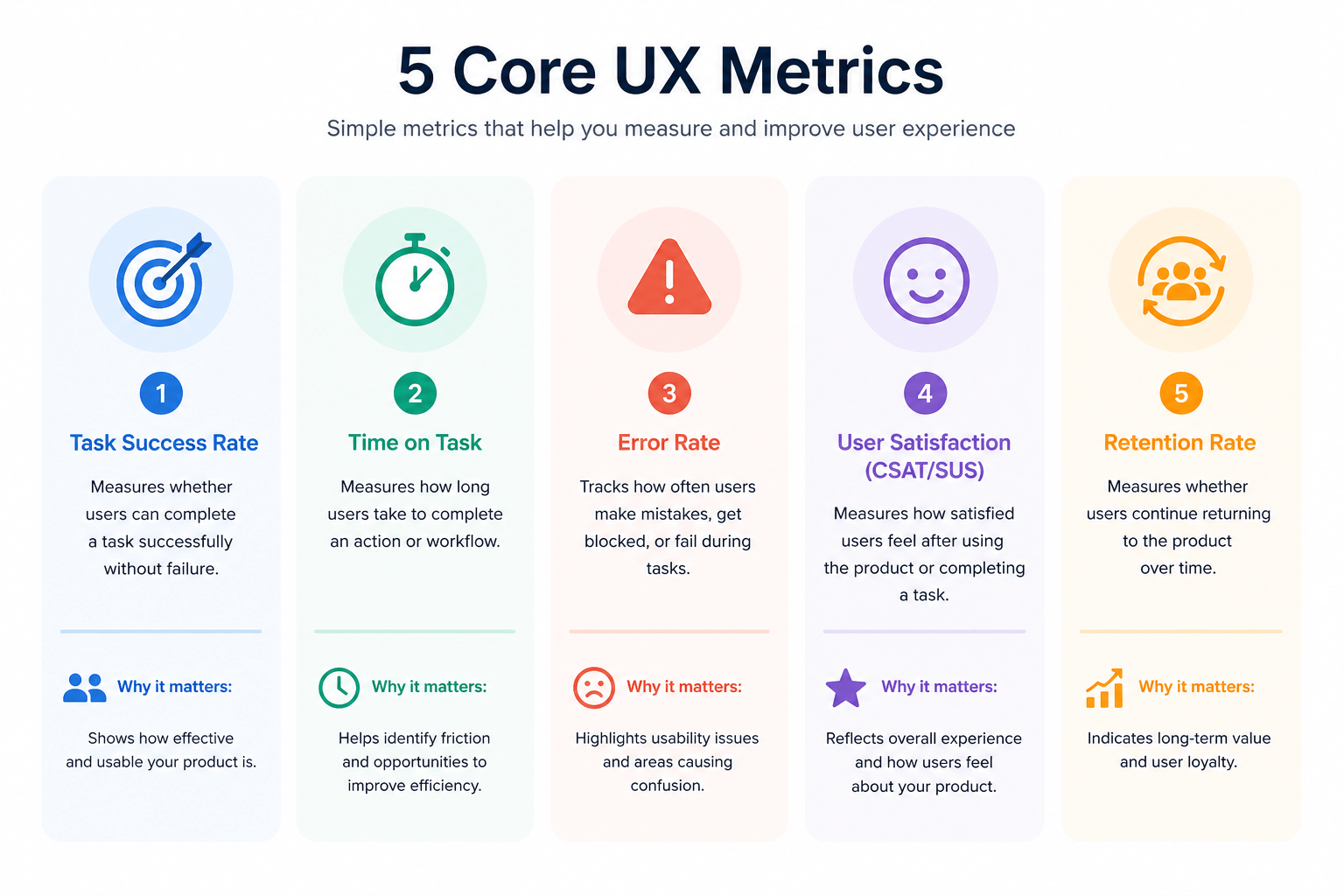
Behavioral metrics track observable user actions through direct measurement of interactions with your product. Click-through rates measure the proportion of users who engage with specific elements after viewing them. Time on task captures how long users need to complete workflows, revealing efficiency issues when completion times stretch longer than expected. Task success rate calculates the percentage of users who complete intended actions, while error rate evaluates how frequently users encounter problems during their journey.
Abandonment rate proves particularly valuable for e-commerce, measuring the ratio of dropped transactions to initiated purchases. Correspondingly, conversion rate tracks users who complete desired actions, and bounce rate assesses how many people leave after viewing just one page. These metrics provide hard data on user interactions, eliminating guesswork about actual behavior patterns.
Attitudinal metrics: how users feel
Attitudinal metrics capture the subjective layer of user experience by measuring thoughts, feelings, and perceptions. Net Promoter Score (NPS) gages recommendation likelihood on a 0-10 scale, classifying users as detractors (0-6), passives (7-8), or promoters (9-10). Customer Satisfaction (CSAT) measures satisfaction through direct surveys, while System Usability Scale (SUS) assesses overall experience via a standardized 10-question format. Customer Effort Score (CES) evaluates perceived difficulty in completing tasks.
Attitudinal data reveals emotional reactions, confidence levels, and hesitation that analytics alone never capture. In contrast to behavioral metrics, these self-reported measures tell you how users feel about their actions, not how they objectively performed.
The difference between UX metrics and vanity metrics
Vanity metrics appear impressive but lack connection to business performance. Page views, total app downloads, and overall user counts grow continuously without revealing anything useful about experience quality. A high NPS score might mask users struggling to complete critical tasks. Long time-on-page could indicate confusion rather than engagement.
Actionable metrics tie directly to revenue, retention, or risk reduction. Task success rates for critical flows like checkout correlate with conversion. Self-service resolution rates reduce support costs. Time-on-task reductions often align with higher retention. Accessibility compliance rates minimize legal risk while expanding market reach to the 1 in 5 people with disabilities.
Pair vanity metrics with behavioral data to reveal the complete picture. Track NPS alongside task success rates to verify satisfaction aligns with actual user behavior.
UX metrics examples that drive measurable growth
Measuring growth requires tracking ux design metrics across five categories that reveal how user experience translates into business performance.
Product adoption metrics
User activation rate measures users completing key onboarding steps that demonstrate product value. Feature adoption rate tracks engagement with specific capabilities, revealing whether users discover and use functionality you built. The DAU/MAU ratio (Daily Active Users to Monthly Active Users) indicates product stickiness, showing how often users return. Time to first value captures how quickly new users experience meaningful wins with your product, directly influencing whether they continue past initial sessions.
Usability and workflow efficiency metrics
Task completion rate stands as the most fundamental ux performance metric. Industry research shows the average task completion rate sits at 78%. Anything above 92% puts you in the top quartile, while rates below 49% signal bottom-quartile performance. Time on task reveals efficiency by measuring how long users need to complete workflows. Error rate identifies where users make repeated mistakes, signaling unclear interface communication. Navigation success rate tracks whether users reach intended destinations without unnecessary detours.
Customer experience and satisfaction metrics
CSAT captures immediate satisfaction through post-interaction surveys. NPS measures recommendation likelihood, with scores ranging from -100 to 100. CES asks how easy tasks were to complete, since lower effort equals higher satisfaction. Product retention rate at 30, 60, or 90 days provides honest measurement of product value over time.
Operational metrics that reveal UX impact
Support ticket volume often traces directly to usability problems. Training time for new users has real cost implications, particularly for enterprise software. Workflow efficiency across teams shows how interface design affects daily productivity. Reduced operational errors in data-entry environments demonstrate how clear labeling and logical form design prevent costly mistakes.
Revenue and retention metrics
Customer retention connects to ease of use, since products that frustrate users get abandoned. Expansion revenue occurs when users upgrade plans or add features, tied directly to satisfying core product experience. Customer acquisition efficiency improves when strong usability reduces dependence on expensive sales cycles. Product-led growth indicators like activation rate and feature usage show how well product experience drives organic growth.
Proven frameworks to measure UX metrics effectively
Selecting the right ux design metrics becomes manageable when you apply structured frameworks that guide your choices.
Google’s HEART framework
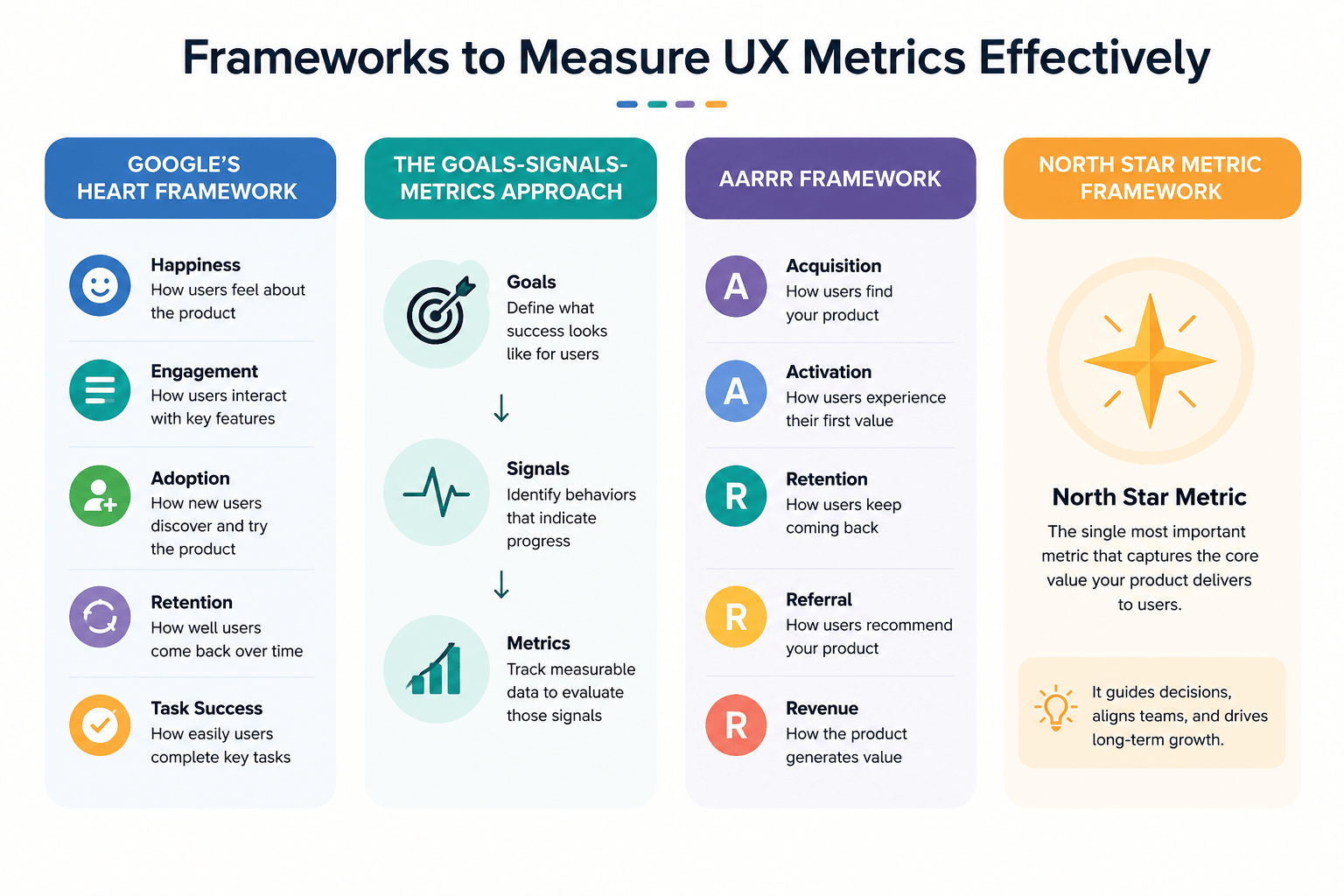
HEART measures user experience quality through five dimensions: Happiness (user attitudes via surveys), Engagement (interaction frequency), Adoption (new user acquisition), Retention (returning users), and Task Success (efficiency and error rates). Created by Kerry Rodden, Hilary Hutchinson, and Xin Fu at Google in 2010, the framework addresses large-scale UX measurement where traditional observation methods fall short. You don’t need all five categories. Choose one or two that align with your product focus.
The Goals-Signals-Metrics approach
GSM prevents the common trap of measuring what’s easy rather than what matters. Start with Goals, which define desired outcomes without referencing specific measurements. Signals represent what you’d measure with perfect knowledge, though they might not be directly measurable themselves. Metrics serve as proxies for those signals, providing concrete numbers you can actually track. This sequence forces you to clarify objectives before selecting measurements.
When to use CASTLE for workplace software
HEART’s engagement, adoption, and retention dimensions assume voluntary product choice. Alternatively, CASTLE addresses workplace applications where users must use the product: Cognitive load, Advanced feature usage, Satisfaction, Task efficiency, Learnability, and Errors. Use CASTLE when measuring enterprise tools, intranets, or systems people use for their jobs.
Combining frameworks for hybrid products
Products with both voluntary and mandatory features benefit from hybrid approaches. Apply HEART to consumer-facing elements while using CASTLE for workflow components that employees must complete.
Building your UX metrics strategy for 2026
Building an effective metrics program requires focus rather than comprehension. Teams often measure everything, then struggle to extract insights that drive decisions.
Start small with 3-5 core metrics
Pick one behavioral metric like task success rate or time on task. Add one attitudinal metric such as SUS or CSAT. Include one business-aligned metric like adoption, retention, or conversion. In an onboarding context, that translates to task success rate on the setup flow, post-onboarding SUS score, and 30-day retention.
Avoid the vanity trap and silo trap
Metrics disconnected from organizational goals fall into predictable patterns. The vanity trap produces numbers that look impressive but offer no insight, like high NPS paired with high churn. The silo trap occurs when UX teams choose metrics without stakeholder buy-in, resulting in measurements nobody outside UX cares about. Convert raw numbers into rates to escape vanity metrics. Involve stakeholders early to prevent silo formation.
Use the right tools for UX analytics
Analytics platforms like Mixpanel, Amplitude, and Google Analytics track behavioral patterns. Usability testing tools such as Maze and UserTesting measure task success and errors. Survey tools collect attitudinal data at scale. Session replay tools reveal where users hesitate or abandon.
Create regular review cadences
Fast-moving products need weekly reviews. Stable products function well with monthly check-ins. Identify metric drops, use qualitative methods to understand root causes, prioritize fixes based on impact, then measure again after changes.
Connect UX improvements to business outcomes
Start with organizational goals like growth, retention, or efficiency. Map UX work to those goals, showing how improving checkout UX supports revenue growth. Choose metrics demonstrating that connection, such as checkout completion rate or time to purchase.
Conclusion
Measuring UX effectively doesn’t require tracking dozens of metrics. Start with three to five numbers that connect directly to your business goals, whether that’s revenue, retention, or efficiency. Choose one behavioral metric, one attitudinal measure, and one business-aligned indicator.
When you track what genuinely matters and review progress regularly, you’ll notice improvements quickly. In the long run, this focused approach proves your design decisions drive measurable growth rather than just looking good on dashboards.
Key Takeaways
These insights will help you measure UX metrics that actually drive business growth rather than just impressive-looking numbers.
• Focus on 3-5 core metrics: one behavioral (task success rate), one attitudinal (CSAT/SUS), and one business-aligned (retention/conversion) • Distinguish between actionable metrics that tie to revenue and vanity metrics like page views that lack business connection • Use proven frameworks like Google’s HEART or Goals-Signals-Metrics to guide metric selection based on your product type • Track task completion rates above 92% for top-quartile performance, as the average sits at 78% across industries • Connect UX improvements directly to business outcomes by mapping design work to organizational goals like growth and efficiency
Remember that measuring everything leads to analysis paralysis. The most successful UX teams track fewer metrics more consistently, creating regular review cadences that turn insights into actionable improvements that stakeholders actually care about.
FAQs
Q1. What’s the difference between behavioral and attitudinal UX metrics?
Behavioral metrics track observable user actions like click-through rates, time on task, and task success rates through direct measurement of interactions. Attitudinal metrics capture subjective experiences by measuring how users feel through surveys like NPS, CSAT, and SUS scores. Behavioral data shows what users do, while attitudinal data reveals their emotional reactions and perceptions about those actions.
Q2. How many UX metrics should I track for my product?
Start with 3-5 core metrics rather than trying to measure everything. Choose one behavioral metric (like task success rate), one attitudinal metric (such as CSAT or SUS), and one business-aligned metric (like retention or conversion rate). This focused approach prevents analysis paralysis and makes it easier to extract actionable insights that drive decisions.
Q3. What is Google’s HEART framework and when should I use it?
HEART measures user experience through five dimensions: Happiness (user attitudes), Engagement (interaction frequency), Adoption (new user acquisition), Retention (returning users), and Task Success (efficiency and error rates). It works best for products where users voluntarily choose to engage. You don’t need to track all five categories—select one or two that align with your specific product goals.
Q4. What’s considered a good task completion rate?
The average task completion rate across industries is 78%. Rates above 92% place you in the top quartile of performance, while rates below 49% indicate bottom-quartile performance. Task completion rate is one of the most fundamental usability metrics because it directly measures whether users can successfully accomplish their intended goals.
Q5. How do I connect UX metrics to business outcomes?
Start by identifying your organization’s primary goals like growth, retention, or efficiency. Then map your UX work to those goals—for example, showing how improving checkout experience supports revenue growth. Choose metrics that demonstrate this connection, such as checkout completion rate or time to purchase, and review them regularly to prove how design decisions drive measurable business results.